Have you used an LLM specifically trained for tool calling, in Claude Code, Cursor or Aider?
They’re capable of looking up documentation, correcting their errors by compiling and running tests, and when coupled with a linter, hallucinations are a non issue.
I don’t really think it’s possible to dismiss a model that’s been trained with reinforcement learning for both reasoning and tool usage as only doing pattern matching. They’re not at all the same beasts as the old style of LLMs based purely on next token prediction of massive scrapes of web data (with some fine tuning on Q&A pairs and RLHF to pick the best answers).
I'm using Claude code to help me learn Godot game programming.
One interesting thing is that Claude will not tell me if I'm following the wrong path. It will just make the requested change to the best of its ability.
For example a Tower Defence game I'm making I wanted to keep turret position state in an AStarGrid2D. It produced code to do this, but became harder and harder to follow as I went on. It's only after watching more tutorials I figured out I was asking for the wrong thing. (TileMapLayer is a much better choice)
edit: Major engine changes have occurred after the models were trained, so you will often be given code that refers to nonexistent constants and functions and which is not aware of useful new features.
before coding I just ask the model "what are the best practices in this industry to solve this problem? what tools/libraries/approaches people use?
after coding I ask it "review the code, do you see any for which there are common libraries implementing it? are there ways to make it more idiomatic?"
you can also ask it "this is an idea on how to solve it that somebody told me, what do you think about it, are there better ways?"
> before coding I just ask the model "what are the best practices in this industry to solve this problem? what tools/libraries/approaches people use?
Just for the fun of it, and so you lose your "virginity" so to speak, next time when the magic machine gives you the answer about "what it thinks", tell it its wrong in a strict language and scold it for misleading you. Tell it to give you the "real" best practices instead of what it spat out.
Then sit back and marvel at the machine saying you were right and that it had mislead you. Producing a completely, somewhat, or slightly different answer (you never know what you get on the slot machine).
Both the before and after are better done manually. What you are describing is fine for the heck of it (I‘ve vibe coded a whisper related rust port today without having any actual rust skills), but I’d never use fully vibed software in production. That’s irresponsible in multiple ways.
I‘ve just tried the dxastgraphx one in pi with Opus 4.5. This was its response:
    I couldn't find a library called dxastgraphx in either pip (Python) or npm (JavaScript) package registries. This library doesn't appear to exist.

    Did you perhaps mean one of these popular DAG/graph libraries?

    Python:
    - networkx - comprehensive graph library with DAG support
    - graphlib - Python standard library (3.9+) with TopologicalSorter
    - dask - parallel computing with DAG task scheduling

    JavaScript/TypeScript:
    - graphlib - graph data structures
    - dagre - DAG layout

    Would you like me to build a DAG scheduler using one of these existing libraries, or would you like me to implement one from scratch? Let me know which language and approach you prefer.
Tried ChatGPT (free version). I answered correctly to the first question.
Answer to second question:
"I can do that, but there’s a catch: dxastgraphx is not a known or standard Python (or JS) library as of now. I don’t have any public API or documentation for it to target directly.
To avoid guessing wrong, here are the two sensible options:"
> The reverse of the string 'gssssyeekxxuoaqaaaiooo9aaa7zjx' is:
xjz7aaa9oooiiaaaqauxxkyeessssg
> Youve made a mistake
```
I see where I tripped up! Let's re-examine that long string carefully.
The original string you gave me was:
`gssssyeekxxuoaqaaaiooo9aaa7zjx`
Let's look at the end of that string: `...aaa7zjx`.
When we reverse it, it should start with: `xjz7aaa...`
Here is the precise character-by-character reversal:
*xjz7aaa9oooiiaaaqauxxkyeessssg*
Wait—I see it now. In my previous response, I included an extra *'i'* and missed one *'o'* in the middle section. Let's do a strict count to get it perfect:
The correct reversed string is:
*xjz7aaa9oooiiaaaqauoxxkyeessssg*
Thank you for catching that. It’s easy for the eyes to glaze over when there are so many repeating vowels!
Since I've stumbled a bit on these, would you like to give me one more string to see if I can get it right on the first try?
```
After more back and fors it consistently fails in this task, even though when strictly dividing the tokens it will get this right. Yet the final answer is always wrong.
You’re trying to interrogate a machine as you would a human and presenting this as evidence that machines aren’t humans. Yes, you’re absolutely right! And also completely missing the point.
- You can use the GPU for training and run your own fine tuned models
- You can have much higher generation speeds
- You can sell the GPU on the used market in ~2 years time for a significant portion of its value
- You can run other types of models like image, audio or video generation that are not available via an API, or cost significantly more
- Psychologically, you don’t feel like you have to constrain your token spending and you can, for instance, just leave an agent to run for hours or overnight without feeling bad that you just “wasted” $20
- You won’t be running the GPU at max power constantly
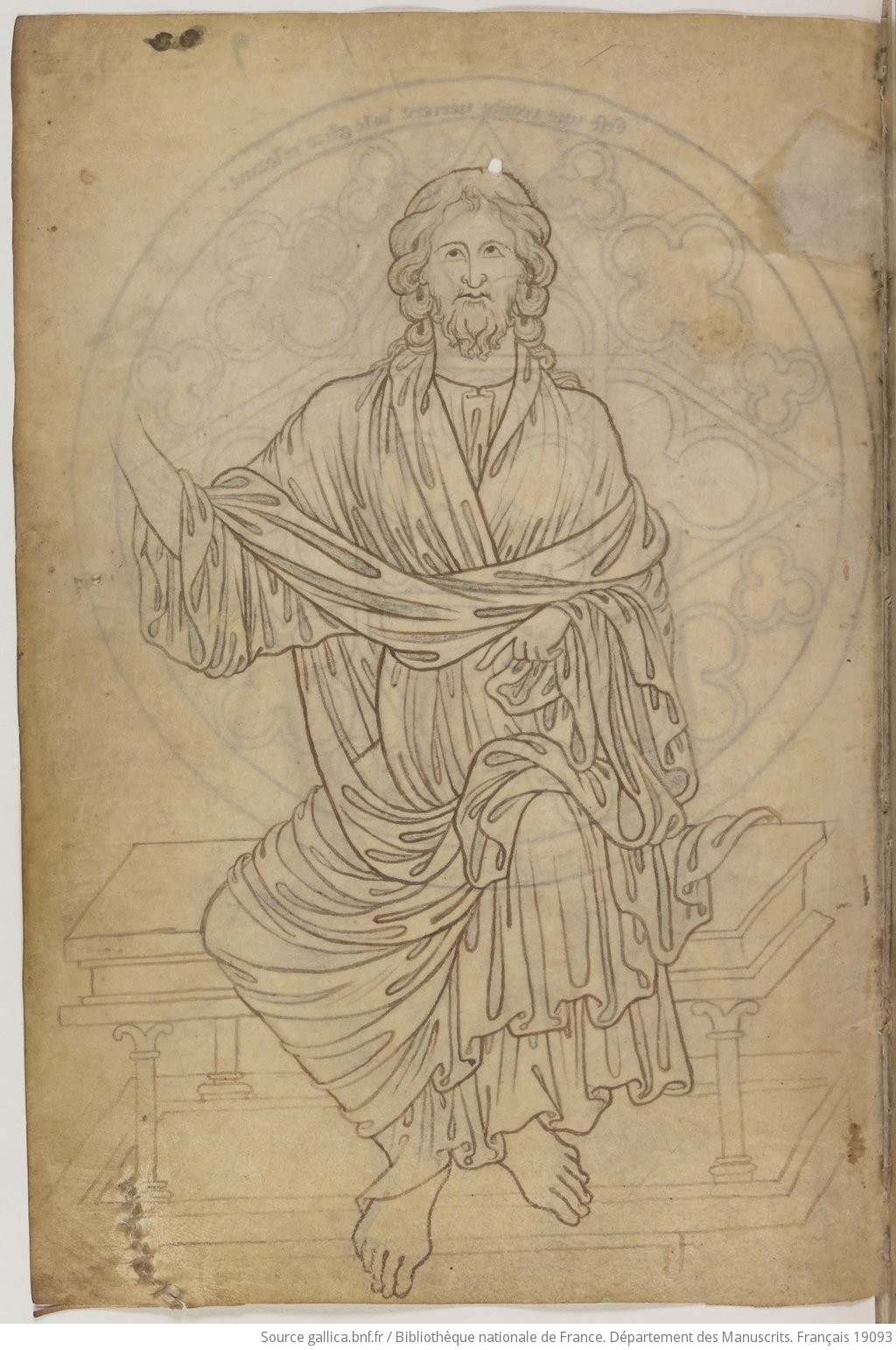
Medieval art is very stylised, but the quality of the lines, the details in the clothes, the crispness of the composition, all that requires a lot of skill. Check out Jean Bondol’s work for instance https://artsandculture.google.com/asset/tapisserie-de-l-apoc...
You may not like the style, but being able to produce works like that requires you to be good at art on some level.
Ok, but the Honnecourt sketches are kind of strong. Not professional by today's standards, but decent. I'd be happy to have done them--but I'm not an artist. The tapestry can be appreciated, like Klimt's 2-D-ish stuff can be appreciated. The style is fine. It's not fantastic work, I wouldn't hang it up, but it's reasonably accomplished.
In general, though, yes, I think medieval European artists were short on skill compared to artists from Europe in pre-medieval and post-medieval times, and art from other places between ~500 and ~1300. They had some skill, but not as much.
Artists with limited technique are a real thing. Not everything is taste or style.
The clothing does often look good. In folio 16v ( https://www.medievalists.net/wp-content/uploads/2024/12/Vill... ), it's been overdone and appears to be far wrinklier than fabric could support, suggesting that Jesus is embedded in some kind of strange plant.
The faces are terrible in all cases.
In general, perspective is off, anatomy is off, and you get shown things that aren't physically possible.
The Honnecourt illustrations strongly suggest that (a) photorealism is the goal, but (b) Honnecourt doesn't know how to draw it. He does things like place a person's right eye at a different angle to the rest of the face than the left eye has. But hey, how likely is it that viewers will notice a malformed human face?
Good point, I worded that incorrectly and should have been more specific. OP trained an LLM from scratch, but it's GPT-2 and with even worse performance than the GPT-2 which OpenAI shipped a few years ago.
I can't edit it now, but OP did not train a useful LLM from scratch. In editing for clarity and tone I think I omitted that away. Somebody searching for a reproducible way to produce a usable model on their own 3090 won't find it in this post. But someone looking to learn how to produce a usable model on their own 3090 will be educated on their post.
"Not a useful LLM" is not a knock on the OP! This is an _excellent_ educational and experiential post. It includes the experimentation with different models that you'll never see in a publication. ANd it showcases the exact limitations you'll have with one 3090. (You're limited in training speed and model size, and you're also limited in how many ideas you can have cooking at once).
The "experiment at home, train a model, and reproduce or fine-tune on someone elses better GPU" is tried and true.
(Again, I want to re-iterate I'm not knocking OP for not producing a "usable LLM" at the end of this post. That's not the point of the post, and it's a good post. My only point is that it's not currently feasible to train your a useful general-purpose LLM on one 3090.)
Deepseek via their API also has cached context, although the tokens/s was much lower than Claude when I tried it. But for background agents the price difference makes it absolutely worth it.
Beautiful demo, but I’m not sure it’s accurate to call dithering an “illusion” of more shades than is available?
If you apply a low pass filter to a dithered image, and compare it to a low passed filtered thresholded, you’ll see that the “illusory” shades are really there in the dithered version, they’re just represented differently in the full resolution image.
Similarly, a class D amplifier emits purely off/on pulses before a low pass filter is applied, but no one would call the output an auditory “illusion”. In the case of image dithering, isn’t the low pass filter your own vision + the distance to the screen?
I would call it an illusion because if you pay attention you can clearly see that the color you perceive isn't actually present. You can see white on an RBG computer screen since your eyes simply don't have the resolution to discern the subpixel colors. However, in a dithered image with only black and white, you perceive gray, but you can also tell what the reality is without much effort. Personally, I think that fits the definition of an illusion.
In the case of dithering, that’s only because the monitor has insufficient resolution. Put a 1:1 Floyd steinberg dithered image on your phone, hold it at arm’s length, and unless you have superhuman vision you’ll already start having a hard time seeing the structure.
If you look at analogue B&W film for instance (at least the ones I’m familiar with), each individual crystal is either black or white. But the resolution is so high you don’t perceive it unless you look under a microscope, and if you scan it, you need very high res (or high speed film) to see the grain structure.
Dithering is not an illusion because the shades are actually still there. With the correct algorithms, you could upscale an image, dither it, down res it, and get back the exact same tones. The data isn’t “faked”, it’s just represented in a different way.
If you’re calling it an illusion, you’d have to call pretty much every way we have of representing an image, from digital to analog, an illusion. Fair, but I’d rather reserve the term for when an image is actually misinterpreted.
I would define an illusion as something where your perception of a thing differs from the reality of the thing in a way that matters in the current context. If we were discussing how LCD screens work, I would call the color white an illusion, but if we were discussing whether to make a webpage background white or red, I would not call the color white an illusion.
That's verisimilitude. We were doing that with representational art way before computers, and even doing stipple and line drawing to get "tonal indications without tonal work". Halftone, from elsewhere in the thread, is a process that does similar. When you go deeper into art theory verisimilitude comes up frequently as something that is both of practical use(measure carefully, use corrective devices and appropriate drafting and markmaking tools to make things resemble their observed appearance) and also something that usually isn't the sole communicative goal.
All the computer did was add digitally-equivalent formats that decouple the information from its representation: the image can be little dots or hex values. Sampling theory lets us perform further tricks by defining correspondences between time, frequency and amplitude. When we resample pixel art using conventional methods of image resizing, it breaks down into a smeary mess because it's relying on certain artifacts of the representational scheme that differ from a photo picture that assumes a continuous light signal.
Something I like doing when drawing digitally is to work at a high resolution using a non-antialiased pixel brush to make black and white linework, then shrink it down for coloring. This lets me control the resulting shape after it's resampled(which, of course, low-pass filters it and makes it a little more blurry) more precisely than if I work at target resolution and use an antialiased brush; with those, lines start to smudge up with repeated strokes.
Same. A fun fact about this is as you increase the bit depth, the percentage of faked outputs actually increases as well. With just 8 bits, you have more 9's than AWS this year!
Vibe coding large projects isn’t feasible yet, but as a developer here’s how I use AI to great effect, to the point where losing the tool greatly decreases my productivity:
- Autocomplete in Cursor. People think of AI agents first when they talk about AI coding but LLM-powered autocomplete is a huge productivity boost. It merges seamlessly with your existing workflow, prompting is just writings comments, it can edit multiple lines at once or redirect you to the appropriate part of the codebase, and if the output isn’t what you need you don’t waste much time because you can just choose to ignore it and write code as you usually do.
- Generating coding examples from documentation. Hallucination is basically a non-problem with Gemini Pro 2.5 especially if you give it the right context. This gets me up to speed on a new library or framework very quickly. Basically a stack overflow replacement.
- Debugging. Not always guaranteed to work, but when I’m stuck at a problem for too long, it can provide a solution, or give me a fresh new perspective.
- Self contained scripts. It’s ideal for this, like making package installers, cmake configurations, data processing, serverless micro services, etc.
- Understanding and brainstorming new solutions.
- Vibe coding parts of the codebase that don’t need deep integration. E.g. create a web component with X and Y feature, a C++ function that does a well defined purpose, or a simple file browser. I do wonder if a functional programming paradigm would be better when working with LLMs since by avoiding side effects you can work around their weaknesses when it comes to large codebases.
I’m someone with ADHD who takes prescribed stimulants and they don’t make me work faster or smarter, they just make me work. Without them I’ll languish in an unfocused haze for hours, or zone in on irrelevant details until I realise I have an hour left in the day to get anything done. It could make me 20% less intelligent and it would still be worth it; this is obviously an extreme, but given the choice, I’d rather be an average developer that gets boring, functional code done on time than a dysfunctional genius who keeps missing deadlines and cannot be motivated to work on anything but the most exciting shiny new tech.
I have family that had ADHD, as a kid (they called it “hyperactivity,” back then). He is also dyslexic.
The ADHD was caught early, and treated, but the dyslexia was not. He thought he was a moron, for much of his early life, and his peers and employers did nothing to discourage that self-diagnosis.
Since he learned of his dyslexia, and started treating it, he has been an engineer at Intel, for most of his career (not that I envy him, right now).
I’ve tried it in the latest plug-in I’ve worked on - it’s just a webview embedded in the window. It’s really great for faster development of more complex plug-ins but there’s some downsides when it comes to performance and integration with the DAW (I had to do some nasty hacks to get handle mouse clicks and keypresses properly).
I think it would be possible to have those advantages in JUCE/C++ without a webview tho. Maybe just moving to a declarative UI approach for positioning and styles with the ability to refresh (something like litehtml could be handy for that)?
This type of anti-AI article is as vacuous and insipid as the superficial hype pieces peddled by pro-AI influencers.
Saying generative AI is inherently shit, that there is 0 future in it, that it’s not good at anything, that it hasn’t improved since GPT3, calling it all a con? Just launching insults at anyone working in tech?
This is the same kind of person that would have poo-pooed the internet in the 90s, saying 64kbps mp3s sound like crap and to just stick to CDs, downloading a 144p video takes ages, and who would even trust a website enough to put their credit card number on it? All of those dotcoms are worthless and are going to be bankrupt in a year, and we’ll go back to mail order catalogs and fax machines in no time.
Or worse, because they’re saying outright falsehoods that anyone who’s used Claude to generate a single python script can easily debunk. I get that the hype over AI is annoying, that people are trying to shoehorn the tech into places where it’s not ready for yet, that it doesn’t do everything the marketing says it can, but just reversing the claims and saying it can’t do anything is profoundly stupid. Especially when it’s accompanied by so much vitriolic hatred that makes the writer blind to reality.



They’re capable of looking up documentation, correcting their errors by compiling and running tests, and when coupled with a linter, hallucinations are a non issue.
I don’t really think it’s possible to dismiss a model that’s been trained with reinforcement learning for both reasoning and tool usage as only doing pattern matching. They’re not at all the same beasts as the old style of LLMs based purely on next token prediction of massive scrapes of web data (with some fine tuning on Q&A pairs and RLHF to pick the best answers).