I sort of wondered about that thinking maybe there's only one logical way to design a git GUI on osx, but then even within this thread people brought up a few other examples that look totally different:
I switched from SourceTree to GitKraken, I don't know all the internal issues of what transpired at Atlasian on the SourceTree team, but to me it's just not the same product that the old Mac app was when they where independent.
I really like GitKraken and the team is taking feedback applying it constructively and putting out an impressive product. The part I really like is it's the same app on OSX, Linux and Windows using Electron to build it was a smart move on their part. My favorite feature has to be dropping a branch on another branch to create a pull request. I don't fanboy stuff much these days but I am a pretty big fan of their's right now.
I already got that question today. So, I'll just repost my answer:
here are some differences from the top of the head:
* Fork has tabbed interface
* For each commit you can see not only changes, but also the whole repository as it was at the moment of commit
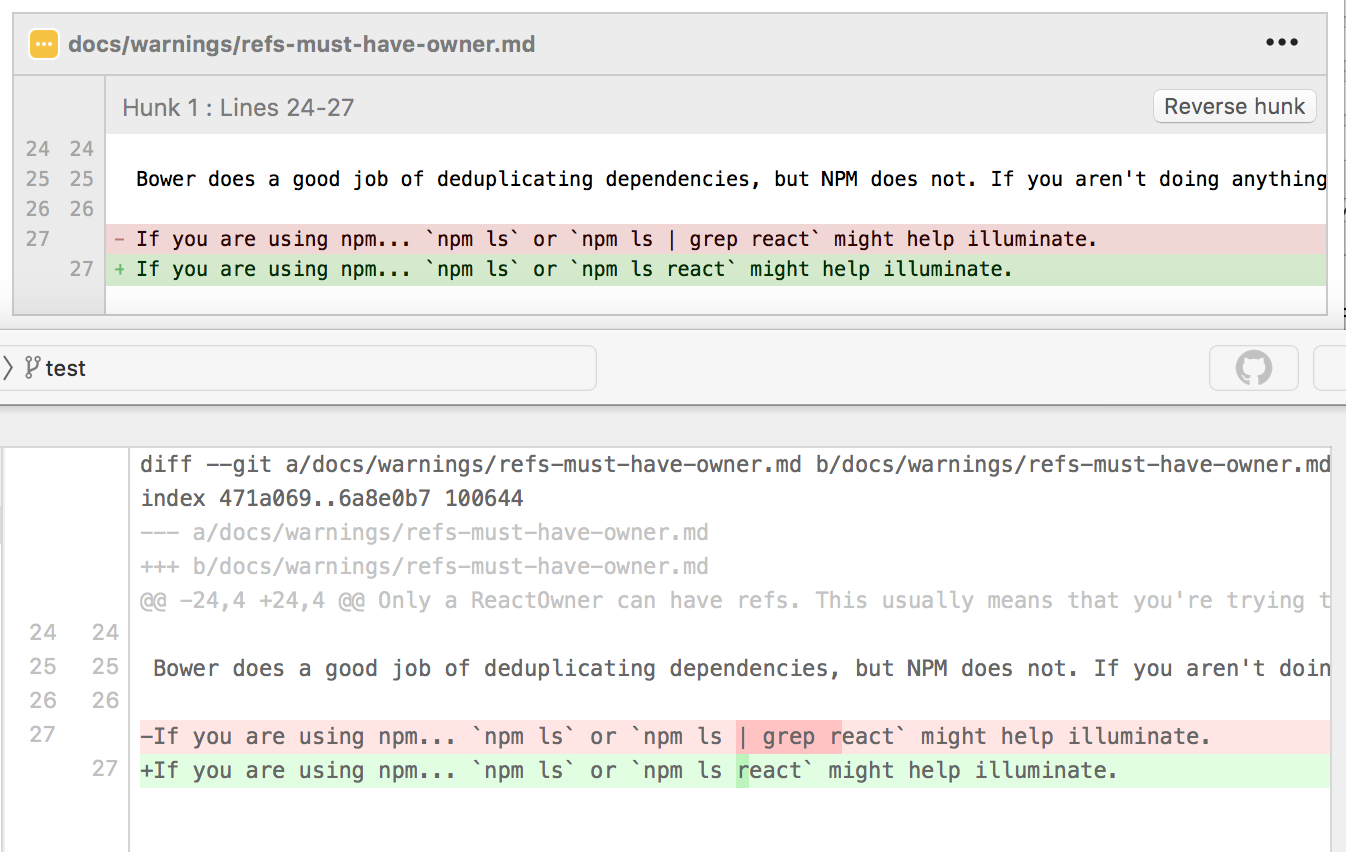
* Diff viewer shows exact difference between two pieces of code. For example, here are both SourceTree and Fork showing the same commit: https://dl.dropboxusercontent.com/s/fn9mzjmyvhec2sa/2016-08-..., In ST (on the top) you need to figure out what has changed, in Fork (the bottom one) you see the difference clearly.
* Repository browser shows you many details about your repositories in the similar way as Finder does
* Commit list marks commits which do not belong to your commit tree with gray color
SourceTree has a tabbed interface as well now. The diff viewer might be interesting if it's really good but I think that to require an external viewer where the company focused on that as a product. On Mac most of the good options are paid though, might help you.
All of the OS X interfaces to Git are, to be honest, quite terrible. Sourcetree is awful. GitHub Desktop is even worse. I've tried a couple of others, the names of which elude me at the moment. I think most of it is less of a complaint against the software itself, and more of a problem with trying to present the complexities of Git in a simplistic UI. The simple fact is: Git as a whole is really, really freaking complex. Making the basic operations idiot proof is difficult enough, and then you have to try to offer a frontend for things like rebasing. Seriously though, fuck the products that pre-select all unstaged files to be added to the index on every commit. If I wanted the file staged, I would add it. Stop harassing me to add my development files - and no, I shouldn't have to gitignore them to prevent being constantly forced to deselect them. By all means, show checkboxes for me to add the files, but do not pre-check them.
I haven't seen a single interface that gets it right. JetBrains' integration in their IDEs is the closest to "mostly usable" I've seen, where branch creation, pulls, merges, conflict resolution, and pushes are fairly straightforward. It's still far from perfect - I do the lower-level Git > Pull rather than using the Update Project window because I have no idea what operations that window performs; and some rare operations still require dropping to command-line. I'd rate their implementation a 7/10 compared to the 3/10 other tools like Sourcetree provide.
A huge reason JetBrains has an insurmountable lead is its diff and merge editor. It is the best on the market, and the only usable side-by-side merge tool I can work with. Their 3-way diff is a dream to use. The last time I had to assist a co-worker merge a conflict using WinMerge on Windows, I gave up after 30 minutes. I flat out could not understand what the differences were, let alone figure out how to resolve the conflicts. Went back to my desk, checked out the branch in JetBrains' PhpStorm, performed the same merge, and had the conflicts resolved in a couple of minutes. It's no surprise to me that people using WinMerge erase work done by other people far too often.
Anti-disclaimer: not affiliated in any way with JetBrains. Their IDEs are mostly amazing, though it's frustrating that they focus 95%+ of their efforts on new features without going back and fixing what is wrong with their existing features. Their diff/merge editor, at least, is unmatched by any other product I have seen to date (other than the fact that CMD+F / CTRL+F to find in the diff editor is broken... again, JetBrains has some serious bugs that never get fixed).
Agree with all of your points. SourceTree nowadays does not select by default (at least my setup doesn't) but it's still far from optimal.
WinMerge? On Windows? I'm using beyond compare which is pretty nice when correctly configured, tortoise internal diff ain't bad either. Both have three way diff which I consider standard for any diff tool. Jetbrains indeed get a lot of things right. Using their resharper (visual studio), webstorms and itellij ultimate versions. They make amazing products.
Does node.js support the * though. I tried their example and getting this:
  app.use(function *(next){
                   ^
  SyntaxError: Unexpected token *
      at Module._compile (module.js:439:25)
      at Object.Module._extensions..js (module.js:474:10)
      at Module.load (module.js:356:32)
      at Function.Module._load (module.js:312:12)
      at Function.Module.runMain (module.js:497:10)
      at startup (node.js:119:16)
      at node.js:901:3
Thank you for your reply. I know we can do some online marketing with Google and Facebook ads. But with those I only get pageviews and not sign-ups or any other activity. Both lists you shared seem to be what I was looking for. I'll get some of the books from both lists.
I used Moo before and the rounded corners was a great addition. The touch and feel of the cards is really professional as well. I'll continue using Moo for my future business cards.


https://www.atlassian.com/software/sourcetree