20V is not a 'stock' DC/DC output voltage, so we're going to look for something roughly 24V and find something that has an adjustable sense line for reducing the output to 20V.
Note that the absolute voltage limit is likely due to 25V electrolytic capacitors in the input circuitry (find a schematic for a model that uses the "20V nominal" PSU and inspect it to be sure), so 24V should be OK as long as you're aware of how far the tolerance of the output of the PSU you're using can be. I suspect the fact that laptop PSUs seem to come in a wide variety of very-close voltages around 20V (I've seen 18.5, 19, 19.5, 20, 21, even 18.75 or 19.25) is more for vendor-lock-in reasons than anything else --- 19V is only 5% less than 20V, and a PSU rated at 20V may even end up at 19V or less under full load from resistive losses. Due to using DC-DC converters, a slightly higher voltage may even increase efficiency as there's less I^2R losses with the lower current that results.
I did check the stock laptop power supply and it came in at 20.4V, which was somewhat curious.
That's only 2% high, and if it was measured unloaded, I wouldn't be surprised.
I explained the reasons for the ~20V standard for laptops in this comment from almost a decade ago, and not that much has changed since: https://news.ycombinator.com/item?id=7594383
It's only been a few days but nobody's responded yet telling me not to, so I'll get on with the experimentation shortly.
And yeah, as I just showed in another comment, I just take "18v" drill packs, which are 5-series strings of lithium-ion and thus range from about 15 to 20 depending on their charge range, and pipe 'em directly into my thinkpad's input jack. It charges quite happily until they get down to about 17.5v at which point the battery doesn't have a ton of charge left anyway, and the thinkpad neatly stops drawing current and avoids flattening the pack.
I run the exact same arrangement, with a different plug tip, into my Evolve III Maestro. It comes packaged with a 12v brick but it's experimentally happy between 10.4 and 25.1 volts, so 15-20 is right on the money.
Some laptops with changable batteries have 4/6/9 cell variants. I know Lenovo has them in the 11-14v nominal (from my head) range, 4s/3s2p/3s3p, so the lower voltage spec for the DC/DC converter might even be lower than 12v.
Woah that comment is a call back, thanks for digging it up.
I think one of the major boundary conditions, aside from 25V caps are just thermal. Laptops can't really radiate more than 100W continuously, and 20V at 5A is a fairly happy balance of wire thickness (defined by current rating) and system battery voltage defined by battery chemistry. A 4-cell lithium string tops out at 16v, and a 20v to 16v dc/dc is marginally smaller than a 60v to 16v dc/dc
> 25V electrolytic capacitors in the input circuitry
Note that the 25V maximum rating on the side of the cap is not a design goal: Good designs will de-rate capacitors for longer life. A typical guideline is to apply no more than 70% of an aluminum electrolytic capacitor's maximum rated voltage, 60% of a ceramic chip capacitor's max rating, or less at elevated temperatures and ripple current levels. See [1] for more guidance, or look up the manufacturer datasheet.
It's just not that expensive to install 35V, 50V, or 63V rated capacitors, and it does so much to extend the lifetime and reliability of the products. I always hate taking apart a $2000 servo drive, PLC, or TV, and seeing a blown $0.40 capacitor where a $0.45 capacitor would have been fine, hopefully it didn't take out any more expensive components when it died.
Of course, my experience is primarily in one-off lab PCBs and <100 unit industrial hardware, so perhaps consumer price sensitivity for mass-market electronics makes this guidance different...
I love the “new” MagSafe charger on my MacBook Air but also love that I can grab a charge from any random USB-C charger and cable if I need to. I regularly charge from a little 18w charger that I use for my phone.
It’s enough to keep the thing going without draining the battery and will charge it overnight fully. It’s pretty great having the option.
USB-C has been great, I now daily carry a 30w pd charger that's basically the same size as those old 5w iphone ones. Works great as a fallback option in a pinch.
You can even charge a MacBook from another MacBook if you happen to find yourself in a situation where you forgot the power adapter but not a USB-C cable.
DeWalt (and the other power tool brands) now offer USB-C PD adapters for their batteries, which might be even easier to assemble if you have a modern laptop that takes USB PD and have already invested in a power tool brand.
I use DeWalt cordless tools and did not know this existed. Probably cool if on the go a lot but steep otherwise.
The article you linked mentions it at the end, but all of their flex batteries should include this port by default.
I suspect DeWalt won't add the port until a major competitor makes them standard.
I was shopping for some L-series batteries for some photography lighting and knew little about the category.
It took a while to figure out to compare listings on Amazon by the date the product was released to find what the newest product capacities and features were.
Only by comparing products this way was I able to figure out the best ones offered input and output across USB C and micro in addition to their primary purpose of mounting to any device accept L series. (Review count and rating average for out of date products confuses comparisons when looking for detail like this)
I don't use cameras that require this kind of battery so having this additional capability made buying a couple batteries for a single product type a bit easier to stomach.
Indeed - when we had a big storm forecast where I live a few months ago I picked one of the ones up for my tool brand as an additional backup for phones and the like if we lost power (and the house battery). Having a few 2/4 Ah packs around that will run USB ports is comforting.
“Your leaf blower battery should be able to charge a laptop.”
Stopped reading right there. I fully believe that on evolutionary timescales, the human race will split into 2 races. There will be the leaf blowing species and the others. The “others” will explore the stars, the leaf blowers will have a decreased cranial volume and stay behind and blow leaves.
Nothing interesting can come from the mind of a leaf blower.
(I kid of course, at least he’s blowing them using batteries and not a 2-stroke engine).
I can't tell you the relief that came, in Portland at the height of the insane and wanton deployment of chemical weapons by a wide range of "police" forces in 2020, from the 'leaf blower dads' showing up to protect the crowds.
Those things worked wonders!
Since then, I've often wondered why people use their spare tear gas dispersers to blow leaves and dirt around, but that's another story.
If you are not testing your tear gas disperses regularly they don't work when you need them. Much better to find out the system has failed when testing on leaves vs when you have tear gas to deal with.
I hate leaf blowers with a passion, but the electric ones I've seen people use are considerably less noisy than the old gasoline powered ones, to the point where I'd mostly consider them acceptable. Either way, this seems like an odd place for this rant, even though I do admit it made me chuckle a bit.
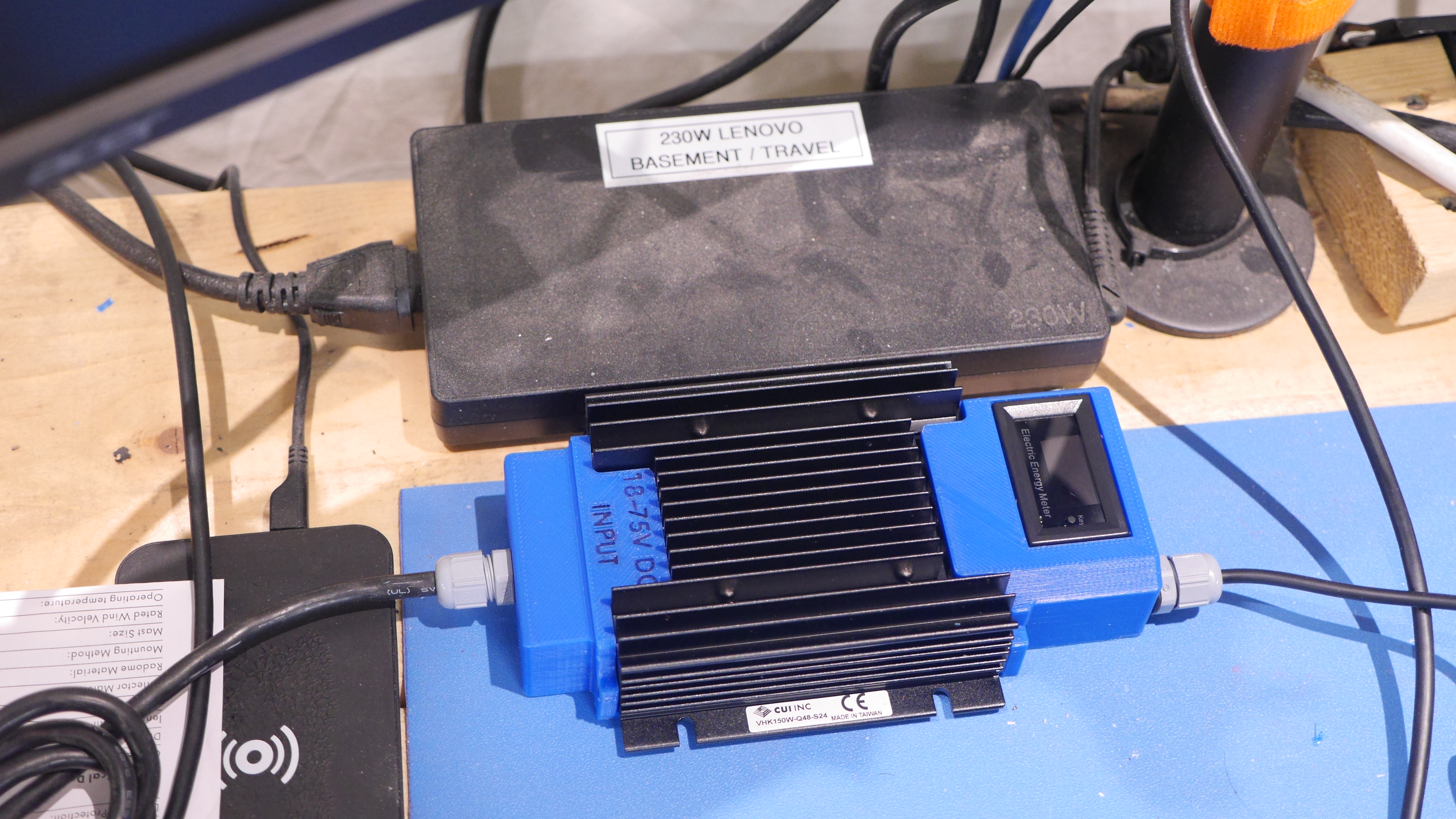
I really enjoy working remotely, like properly out in the woods. For whatever reason most of the 'desktop replacement' laptops refuse to use external USB-PD battery banks so I designed a quick in-line adapter around an industrial DC/DC converter. Its fairly quick to assemble and thought this might be of interest to some of you.
One cool thing I like about the USB-C Macs (at least the MacBook Airs, but probably the rest too) is that they'll even happily take 5V from USB-C. May not get enough amperage to actually charge while in operation, but will extend internal battery lifetime. They'll also take 12V. And probably 9V, 15V and 20V.
I always wondered if they can accept any voltage over the range. Can I just plug in a solar panel and it will happily charge even as it cuts in and out at low voltages?
Unless your Macbook negotiates USB-PD, or USB-C standard 5V mode, it won't charge. There's a USB-PD controller in front of all the USB ports, so they will not pass any current in unless it gets the right signaling.
If you just try to trick it, there's over- and under-voltage protections built-in, so it should shut off if you just let the voltage float around.
Stick with something in-between to handle the solar.
That is so refreshing, yeah the lenovo P series just ignores USB-PD inputs as it nominally wants 135W external power minimum. The kicker is it rarely ever draws more than 90w
My P1 (G4) gladly accepts power over USB-C, depending on what I'm doing the 80W my monitor supplies are not enough and it slowly discharges, but it's enough to keep it going for a day's worth of work and recharge over night.
Except that it does not unlock full power unless the slim-tip is there. It is a bit slower but on the plus side it is dead quiet and runs a lot cooler.
My ROG Zephyrus M15 only supports up to 65W in through the Thunderbolt port, even though it's a 230W laptop. Two hundred and thirty watts, and they couldn't even accept 100W over USB-C PD, they had to limit it to 65W.
I'm in the process of replacing the crappy thing with a proper desktop.
Personally, I wouldn't. An external battery is cheap; Macbook Air logic board replacements are actually free if you have AppleCare+, but then you lose your laptop for days while it's being repaired. I'd just have the solar panel just charge a (small, portable) battery and use that battery to charge the laptop, with bonus points for not having to have your laptop tethered to the solar panel if you want to use it while the sun is out.
As far as the Macbook air goes, the official chargers will do 5V, 9V, 15V and 20V output, so yeah, no probably; it supports those.
I tried feeding my ASUS Zephyrus G15 (GA503QM) 5V over USB-C once. It discharged faster, because it decided “hey, I’m plugged in, I can consume more power”, and even my attempts to reduce it by controlling the CPU’s power limits (which absolutely reduces its consumption when unplugged) didn’t make it discharge more slowly than not being plugged in.
I think I estimated it was getting around 1.5W (by putting it to sleep for hours and comparing the small amount it had filled by with the drain of a similar period unplugged), though the wall adapter is rated for 11.5W (5V/2.3A), and certainly charges a phone at about that.
A "12v" solar panel typically has an open-circuit voltage around 22v, which is probably fine, but I don't know how Macs are made. You might want to exercise it a little with a benchtop PSU and some instrumentation first.
I wonder if any laptop power-input circuits are agile enough to perform MPPT and extract a bit more juice out of a panel thus provided...
My work MacBook Pro will already last two workdays
of normal use on a full charge when I am at a customer’s site in meetings, taking notes, doing PowerPoint presentations, etc.
I then carry this around that got me through a third day (Amazon. Not an affiliate link.)
Anker 747 Power Bank (PowerCore 26K for Laptop), 87W Max Output with 65W USB-C Charger, https://a.co/d/52vd8Ec
This is the largest battery allowed on an Airplane.
This is a great article with a lot of lovely detail and photos…and yet I was left wondering how the author actually connected it to the e-bike’s battery—was it directly? Via the bike’s charging port? I’d love to know more about the actual mechanics of _that_ and how they went about it because I’ve long wondered why these modern e-bikes don’t offer more ways to charge other devices from them (with a few exceptions in the Bosch lineup, with the ‘smart hub’ that they sell).
Thanks for the question, I completely missed that part. I'm using a homemade e-bike where the battery is just connected with a standard Anderson connector. A lot of off the shelf battery modules do have proprietary connectors, but a fair number have been documented.
The M365 scooter batteries for instance are 36V 9AH and they connect with a hobby XT series connector.
Depending on how the laptop is setup, it probably does (many are actually pretty "accepting" of slightly varying voltages because they're just charging a battery/changing the voltages internally anyway).
I miss the days when the ThinkPads came with both an internal swappable battery and external swappable battery. You could just swap out the battery if it was running empty and continue working. All of this is neat and all, but it's a horrible messy kludge in comparison.
Oh no, the laptop has that too. :) It's a T460, has a 23.5wh internal battery under the palmrest, part number 45n1113, and another also-23.5wh removable battery that slides out the back, part number 45n1127.
But Ryobi batteries are cheaper than Lenovo batteries, and I can use them for more other stuff so it's easier to justify owning a whole pile of them.
I miss the days of the docking-station-shaped "battery slice" which added even more to the bottom of the machine. But evidently they may still make those and I'm just not seeing them in the wild? Anyway, the Ryobi solution is so simple and efficient, it's not worth shopping for alternatives.
Just be aware that you get what you pay for. I have experience with these specific converters, and many of them have no thermal protections. If you overdrive them (e.g. more than 1/3 of their "rated" capacity), you run a pretty high chance of burning them out.
I've used those before, they have a horrifying amount of noise on the output, lots of RF noise, and a very audible high-pitch whine. They also overheat very quickly even at half the 'rated' load.
Made something similar that outputs 12V/24V to use an inverter for 220V appliances. Which also allows generic USBC adapterw for the car to work, which do a much wider range of voltages than just 20V (with the ducurrent limitation of max 100W/5A).
Mostly have been using it to charge Lipos for RC (cars and drones) on the go.
Nice and tidy indeed! Overall packaging looks robust and the threaded gland nuts push it over the top. Nicely done. Now I just have to stop playing around with the embedded 3D model and make one for my scooter :D
So this is AC -> battery -> AC but your DC setup should work too, skipping charging. The lifepo4 batteries have enormous capacity for not too much money.
That DC/DC converter is quite large and expensive for the rated power, no? If you’ve got a stable low-impedance DC source, I imagine you could do a lot better following a TI application note :)
I picked up a very tiny 65W GaNFET usbC brick recently, I’ve been curious to see DIY projects put that technology to use. Marginally higher part cost but significantly better efficiency.
There's definitely ways to shrink this down and I tried to address that in the initial DC-DC selection. The minimum supply that certain P-Series Lenovos require is 135W, while this module is rated for 150W, it is available surplus for relatively cheap (40$) without requiring building a full enclosure.
Looking forward to taking a second pass at this and shrinking it down.
at the moment it's somewhat smaller than the stock 'brick':
I am doing a similar thing but for a Mac Studio running Asahi Linux (13 W idle, 215 W max), since DC/DC was not an option I am using https://www.amazon.com/CAT-Professional-Station-Starter-Comp... (200W max) which was half price at Costco. A power adapter that can also inflate tiers and jumpstart other veihicles.
Would anyone know if I can charge it while the computer is plugged? I usually assume that is a no / no, but if I were to try, could something explode?
It should be fine to try. Some devices dual purpose the 120 volt transformer to both charge the battery and provide 120 VAC, but those have internal switching so the 120 VAC will simply not work when charging. Given that your device charges using a wall wart, it won't be this type of device because the charging transformer is built into the wall wart. Having a lead-acid battery the charge from the wall wart likely goes to a common power rail that connects to both the battery and the inverter. About the only bad thing that could happen is that a crappy wall wart might try to supply too much power and overheat. I would check if the wall wart is getting excessively hot when running your test.
Also, I took a look at the user manual for the device and it doesn't mention not to try what you are thinking, so it should be fine.
> Checking against the datasheet, I came up with ~12.7k to get to 20.4V and the closest I had on hand was 13K
You can measure the 13kOhm resistors that you have and see if there is one with a better matching value. 12.7k is ~97-98% of 13k which is well inside the tolerance of your resistors (it says 5% on the bag).
What is the power loss to heat? I am thinking about using Rad Cycle batteries as a power source for my van (instead of a Jackery, Goalzero, etc) The batteries are 48V, 600Wh and I mostly just want to be able to convert to 5V up to 2.4amps. Is this possible and is this a dumb idea? Any pointers welcome.
I thought it was a "ride faster if you don't want your laptop to shut down and drop your call" kind of experiment, but it's more of a "let's run a laptop on a big battery from an e-bike", should have read the title more carefully.
I saw a TV program where they tried to live off-grid and set up a bike generator to charge a big battery. They found out that the human body produces less power than you'd think.
Sort of off topic - But I think consumer UPS have fallen short. A) They stick with SLA and not something like LiFePO4 and B) They haven't fully embraced USB-PD.
A UPS with LiFePO4 and USB-PD should give you hours of backup power.


Note that the absolute voltage limit is likely due to 25V electrolytic capacitors in the input circuitry (find a schematic for a model that uses the "20V nominal" PSU and inspect it to be sure), so 24V should be OK as long as you're aware of how far the tolerance of the output of the PSU you're using can be. I suspect the fact that laptop PSUs seem to come in a wide variety of very-close voltages around 20V (I've seen 18.5, 19, 19.5, 20, 21, even 18.75 or 19.25) is more for vendor-lock-in reasons than anything else --- 19V is only 5% less than 20V, and a PSU rated at 20V may even end up at 19V or less under full load from resistive losses. Due to using DC-DC converters, a slightly higher voltage may even increase efficiency as there's less I^2R losses with the lower current that results.
I did check the stock laptop power supply and it came in at 20.4V, which was somewhat curious.
That's only 2% high, and if it was measured unloaded, I wouldn't be surprised.
I explained the reasons for the ~20V standard for laptops in this comment from almost a decade ago, and not that much has changed since: https://news.ycombinator.com/item?id=7594383